MULTISPORT CARD – REGISTRATION AND ORDERING
My MultiSport platform
Link: https://mymultisport.benefitsystems.hr/
The MultiSport card can be ordered in the following ways:
- by self-registration using your official email address
- via an invitation from your employer
The MultiSport card must be ordered and paid for IN THE CURRENT MONTH, and it becomes active on the first day of the NEXT MONTH.
You can order the virtual MultiSport card until the last working day of the month.
For the option of ordering a plastic card, the deadline is the 20th day of the month.
REGISTRATION INSTRUCTIONS:
- Click on the LINK and register using your personal details.
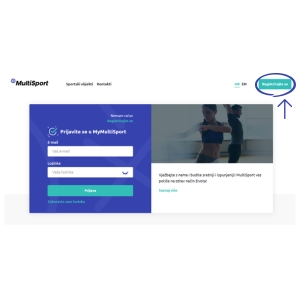
2. If you are an existing user, register using your MultiSport card details. If you are a new user, click I do not have a MultiSport card yet.
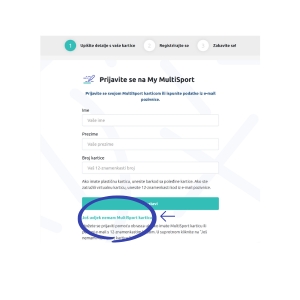
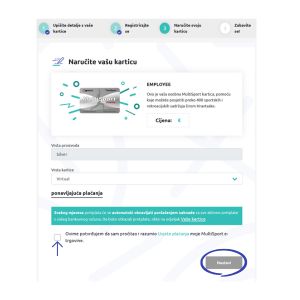
3. Confirm your MultiSport card order by clicking Continue.
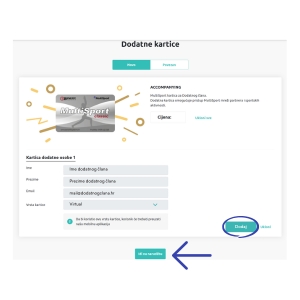
4. Along with your active MultiSport card, you can also order a card for an additional member by clicking ADD and then Go to order.
5. Complete the order by accepting the payment terms and clicking Confirm.
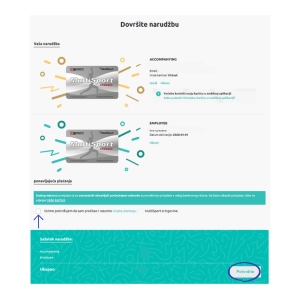
6. You can check whether the payment has been successfully completed on the My MultiSport platform under the Payments section. The invoice will be sent to your email within 24 hours of payment.
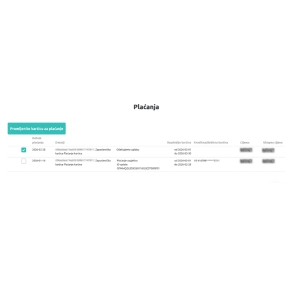
IF PAYMENT IS NOT COMPLETED, THE MULTISPORT CARD WILL NOT BE ACTIVE FROM THE FIRST DAY OF THE FOLLOWING MONTH.
- EMAIL WITH MULTISPORT CARD DETAILS
An email with your MultiSport card details will be sent by Benefit Systems from donotreply@benefitsystems.hr. If you have not received the email, please check your spam or other folders. If you still cannot find your registration details, please contact customer support at: - Phone: 0800 222 023, email: kontakt@benefitsystems.hr
- ADDITIONAL CARD
After ordering your MultiSport card, it is possible to order an additional MultiSport card for an additional member. The payment must be made in the current month for the card to be valid from the first day of the following month.- For example, a payment made on February 1st is valid from March 1st.
- You can order the virtual MultiSport card until the last working day of the month. The deadline for ordering the plastic MultiSport card is the 20th day of the month.
- CARD DEACTIVATION
The MultiSport card can be deactivated at any time during the month via the My MultiSport platform. The card becomes inactive on the first day of the following month.
- INACTIVE USER
To reactivate the MultiSport card, log in to the My MultiSport platform and click the Activate option. - Cards activated in the current month become active on the first day of the following month, provided payment is completed in the current month.
- PAYMENT DEADLINE
Payment must be made by credit or debit card in the current month for the MultiSport card to be active from the following month. Without timely payment, the MultiSport card will be deactivated on the first day of the following month.- For example, a payment made on February 1st is valid from March 1st.
- SUCCESSFUL / UNSUCCESSFUL PAYMENT
You can check whether the payment was successful on the My MultiSport platform in the Payment section.
- LATE PAYMENT
The MultiSport card cannot be activated on the same day the payment is made, in accordance with the defined payment deadlines.
- PAYER DETAILS
Payment may be made by another person — the payer does not need to be the MultiSport card holder.
- THIRD-PARTY CARDS
Cards issued by third parties (e.g., Revolut, Aircash, etc.) can be used if their settings allow online and recurring payments. In case of payment issues, please contact your card issuer.
- FUTURE PAYMENTS
Payment details need to be entered only once, and charges are processed automatically every month starting from the 20th day of the month.
- CHANGING THE PAYMENT CARD
The payment card can be changed at any time via the My MultiSport platform in the Payment section. The change applies to future payments.
- INVOICE
The invoice is automatically sent by email within 24 hours of payment processing. If you have not received it, please check your spam or other folders. The invoice is generated and sent by Benefit Systems d.o.o., while PayU sends the payment status notification.
- MOBILE PHONE DOES NOT SUPPORT THE MY MULTISPORT APPLICATION
To use the application, the system requirements are: iOS 17.0 or later, Android 11 or later- Huawei and other Android devices without access to Google Play are not supported.